
bKash APK Download (v) for Android in Bangladesh
1 Hour Ago
60 MB
7.3.5
Android 5.0 and above
15M+

Description
Money transfers in Bangladesh have become much easier with mobile financial services. Instead of visiting a bank for every small transaction, people can now send money, recharge a phone, pay bills, shop, receive remittance, and manage everyday payments directly from a smartphone. bKash is one of the major apps built around these daily financial needs.
The bKash app is more than a simple money-transfer wallet. It combines payments, mobile recharge, cash out, add money, bill payment, savings, remittance, bank transfers, request money, education fees, and several other financial services in one account. The official app has also crossed 100 million downloads across its supported app stores, showing its large user base.
For Bangladeshi users, its biggest advantage is convenience. A person can open the app, check the balance, complete a payment, review transaction history, or find another financial service without managing several separate apps.
What is bKash App?
bKash is a mobile financial service that allows registered users to manage money from their phones. A user’s registered mobile number works as the bKash account number, making the service easy to connect with everyday mobile use.
The Android app provides a visual dashboard for accessing the service. Users can send money, make merchant payments, recharge mobile numbers, pay bills, add money from supported banks or cards, and check previous transactions. It also supports Bangla and English, allowing users to choose the language they find easier.
What makes the app particularly useful is how different financial tasks are connected. Money received in the wallet can be used for supported payments and services without requiring a separate account for every activity.
If you are also exploring career opportunities in Bangladesh, the BDJobs App is worth checking out. It helps job seekers search vacancies, explore different career fields, manage applications, and stay updated with new employment opportunities from their mobile phones.
bKash App Overview
| Details | Information |
|---|---|
| App Name | bKash |
| Developer | bKash Limited |
| Category | Finance |
| Main Market | Bangladesh |
| Platform | Android and iOS |
| Account Currency | Bangladeshi Taka |
| Languages | Bangla and English |
| Main Use | Mobile financial services |
| Registration | Available through the app |
| Security | PIN, verification, and supported biometrics |
The available services continue to develop, so users can check the latest app to discover newly added tools and current offers.
Blog: Four Useful Apps in Bangladesh for Daily Tasks
Why bKash App Is Popular in Bangladesh
The app solves several everyday payment needs from one place. A student may use it to recharge a mobile number, while another user may need to send money to family. Someone else may use it for utility bills, shopping, cashing out, or receiving remittance.
This flexibility makes the service useful for different types of users. The official service list currently includes Send Money, Mobile Recharge, Payment, Cash Out, Add Money, Pay Bill, Savings, Loan, bKash to Bank, Request Money, Remittance, Education Fees, Donation, Insurance, and other services.
Its large network also extends the experience beyond the app. Users can interact with supported agents, merchants, ATMs, and other available financial channels when they need services involving physical cash or merchant payments.
Best Features of bKash Android APK
Send Money
Send Money lets users transfer funds from one bKash account to another. Because the account is connected with a mobile number, users can enter the intended account information and complete a transfer directly from their phone.
Scan QR
QR payments reduce the need to manually enter account information in supported situations. Users can scan compatible customer, agent, or merchant QR codes for available transactions.
Mobile Recharge
Users can recharge prepaid numbers and access supported postpaid mobile payment options. The app currently covers major Bangladeshi operators, including Grameenphone, Banglalink, Robi, Airtel, and Teletalk.
Pay Bill
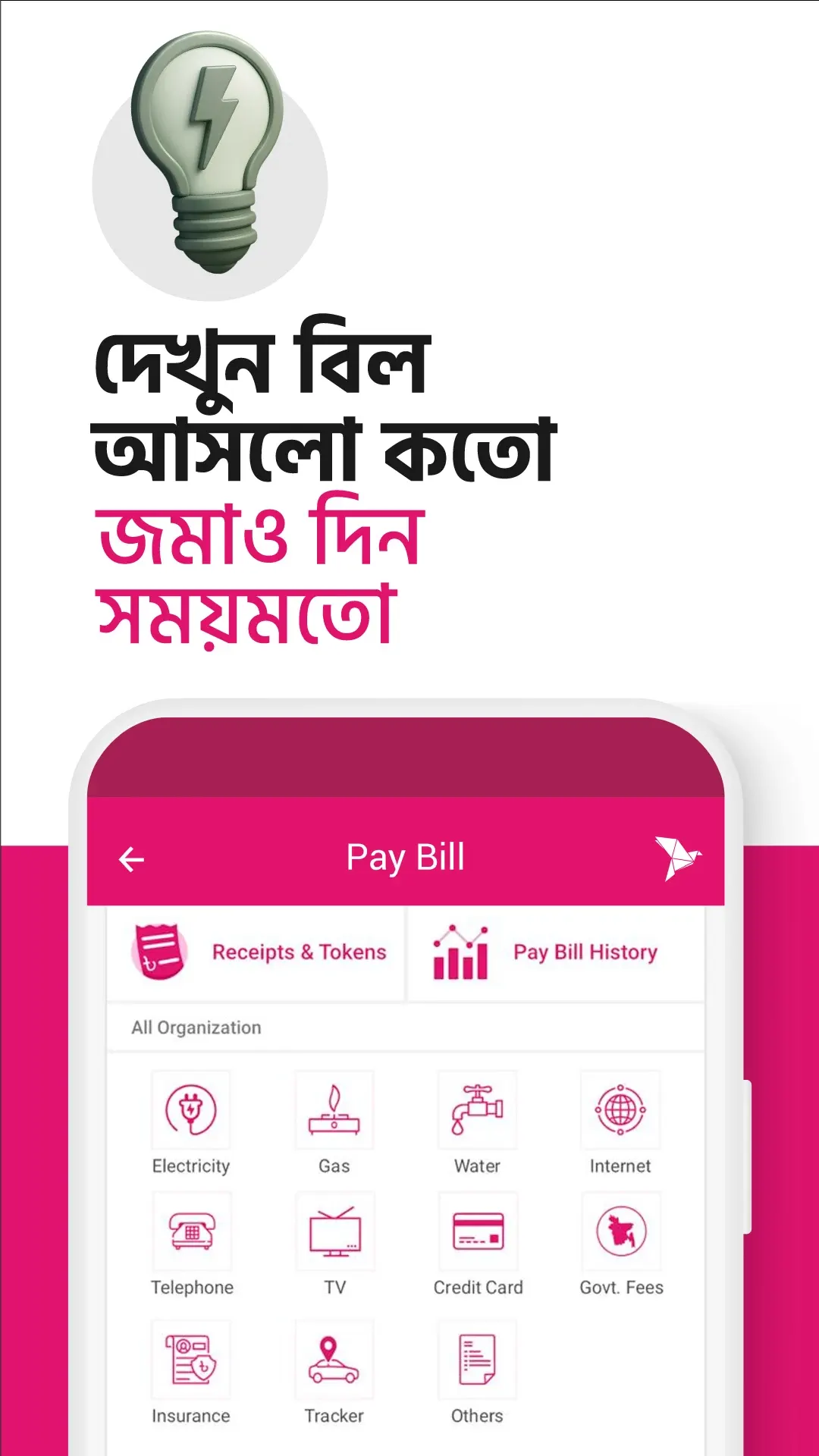
Monthly bills can be managed without standing in a payment line. bKash supports payment services covering areas such as electricity, gas, water, internet, telephone, television, and other supported billers.
Add Money
Users do not always need an agent to put funds into their wallet. The Add Money service supports transferring money into a bKash account from eligible bank accounts and cards.
Cash Out
Cash Out converts eligible wallet balance into physical money through supported channels. Users can access bKash’s available agent network and supported ATM facilities for this purpose.
Request Money
Sometimes the user who needs money is not the person starting the transfer. Request Money allows an eligible user to send a money request to one or multiple bKash customers through the app.
bKash App: More Financial Services
The app has expanded beyond its original money-transfer functions. Several additional services now make it closer to a broader financial platform.
Savings
Eligible users can explore savings options offered through participating banks or financial institutions. Official bKash information describes weekly or monthly deposits that can be managed through the app. This gives users another way to organize money for future plans without leaving the familiar app interface.
Loan
Loan facilities are also available for eligible customers through the app. Availability depends on the service and account eligibility, so the options displayed to the individual user are the most relevant.
bKash to Bank
The bKash to Bank feature connects the mobile wallet with supported banking services. It gives eligible users another way to move funds without handling everything through cash.
Education Fee
Students and families can use supported education-payment services to pay fees from the app. This can save time when an educational institution is available through the service.
Insurance and Donation
Insurance and donation options further expand what users can do with their balance. Instead of treating this app only as a person-to-person transfer app, these services turn the wallet into a payment point for different financial activities.
Receive Remittance in Bangladesh
Remittance is an important feature for Bangladeshi families receiving money from relatives living abroad. Funds sent through authorized partner banks, money transfer organizations, and exchange houses can be received in a valid bKash account.
Recipients can then use the available balance for supported services or cash it out through an eligible channel. The app also provides remittance-related transaction information, making it easier to keep records of received funds.
This creates a convenient connection between international remittance and everyday local mobile payments.
How to Download bKash App on Android?
Android users can install the official application and access its financial services directly from their phone.
- Open the official app store on your Android device.
- Search for bKash.
- Check that the developer is bKash Limited.
- Select the official application.
- Tap Install.
- Wait for the installation to finish.
- Open the app.
- Explore the available services or start account registration.
Checking the developer name is a useful step because a financial app handles sensitive account and transaction information.
Create a bKash Account
New users can register through the app. Official information states that account opening can be completed by following the in-app process and submitting the required identity information, including supported NID or birth certificate options depending on the account type and process.
The general flow is
- Open the app.
- Choose the account-opening option.
- Enter your active Bangladeshi mobile number.
- Follow the identity-verification process.
- Provide the requested personal information.
- Complete the steps displayed by the app.
- Wait for account confirmation.
- Set your secure PIN as instructed.
- Log in and explore your account.
Users should enter their own correct information because the wallet is connected with financial transactions and identity verification.
Set Your bKash PIN
The PIN acts as an important layer of account protection. After receiving registration confirmation, users can set their five-digit PIN through the app or the supported mobile menu. Official instructions currently tell newly registered customers to set the PIN within 72 hours of receiving their confirmation SMS.
Choose a PIN that is difficult for another person to guess. Avoid simple patterns based on information other people may already know.
Most importantly, keep the PIN private. It should not be shared with friends, shopkeepers, agents, or anyone requesting it through a message or phone call.
Login and Biometric Access
The app uses account authentication before providing access to financial services. On compatible devices, eligible users can also activate Fingerprint or Face ID as an alternative authentication method for supported login and transaction functions.
Biometric access can make regular use faster because users can confirm their identity using the supported security feature already configured on their device.
Users who prefer the traditional method can continue using their PIN where supported.
Send money with bKash Wallet app
Sending funds to another bKash user takes only a few steps:
- Log in to the app.
- Select Send Money.
- Enter or choose the receiver’s bKash number.
- Enter the amount.
- Add a reference when useful.
- Review the receiver and transaction details.
- Confirm using the required authentication.
- Check the successful transaction information.
Always review the receiver’s number before confirmation. A few seconds spent checking the details can prevent sending money to the wrong account.
Make Payments with QR
QR payments are useful when shopping at supported merchants. Instead of manually entering a merchant number, users can scan the available QR code and continue with the payment.
- Open the app.
- Select Scan QR.
- Scan the supported merchant QR.
- Check the merchant information.
- Enter the required amount when needed.
- Review the payment.
- Authenticate the transaction.
- Keep the confirmation for your records.
Recharge Any Major Mobile Network
Mobile recharge is one of the app’s most practical everyday features. Users can recharge their own number or another supported mobile number without purchasing a physical recharge card.
The process is simple:
- Select Mobile Recharge.
- Enter or select the mobile number.
- Choose the operator if required.
- Enter the recharge amount or select an available offer.
- Review the details.
- Confirm the recharge.
- Check the transaction confirmation.
The ability to explore available bundles can also help users choose a recharge that better matches their internet, voice, or regular balance needs.
Pay Utility Bills from Home
Users can handle many recurring payments through the Pay Bill section. Instead of visiting a physical counter each month, they can search for an available biller and complete the transaction from their phone.
The exact information required depends on the bill. Users may need an account, customer, meter, or other bill-related number before continuing.
After payment, the available digital receipt and transaction details can be useful for keeping personal records.
Check Balance and Transaction History
A financial app should make it easy to understand where money is going. bKash provides a quick balance-check feature as well as detailed transaction history and monthly transaction summaries.
Users can review previous activity to find a transfer, recharge, payment, or other recorded transaction. This is especially useful for people who use their wallet frequently throughout the month.
The app also provides a real-time view of transaction limits, helping users understand how much more they can transact within the applicable limit.
Offers and Cashback
The Offers section gives users another reason to check the app before making a payment. bKash regularly features cashback, discounts, merchant campaigns, bill-payment promotions, and other eligible offers.
Offers can differ by merchant, service, account, date, or campaign. Reading the current conditions helps users understand where the benefit applies and what they need to do to qualify.
This also means an old promotion should not be treated as a permanent app feature. The latest Offers section gives a clearer picture of what is currently available.
Keep Your bKash Account Secure
Financial account security depends on both the app and the user. bKash uses PIN and verification mechanisms for account access and transactions, while compatible devices can provide supported biometric authentication.
A few habits can make everyday use safer:
- Never share your PIN or verification code.
- Check the receiver before sending money.
- Keep your registered SIM under your control.
- Use your own device whenever possible.
- Review transaction confirmations.
- Avoid giving account credentials to unknown callers.
- Check QR information before approving a payment.
- Keep the official app updated.
A genuine support process should never require users to casually hand over secret account credentials.
Forgot Your bKash PIN?
Forgetting a PIN does not necessarily mean losing access permanently. bKash provides PIN-reset options through the app and other supported channels.
On eligible Android accounts, the current app process can begin from Forgot PIN?, followed by verification and face scanning where applicable. After successful verification, the user can follow the provided steps to create a new PIN.
Users should complete recovery through the official process rather than asking another person to manage their account.
Useful bKash Services at a Glance
| Service | Useful For |
|---|---|
| Send Money | Transferring money to another user |
| Cash Out | Converting wallet balance into cash |
| Mobile Recharge | Adding mobile balance or buying eligible bundles |
| Payment | Paying supported merchants |
| Scan QR | Faster supported QR transactions |
| Add Money | Moving money from eligible banks or cards |
| Pay Bill | Paying supported utility and other bills |
| Request Money | Requesting funds from other users |
| Remittance | Receiving eligible overseas remittance |
| Savings | Building savings through participating institutions |
| bKash to Bank | Transferring through supported bank services |
| Education Fee | Paying participating institutions |
| Offers | Finding eligible discounts and cashback |
The range of services is one reason the app can be useful even for people who rarely use person-to-person transfers.
Pros and Cons
| Pros | Cons |
|---|---|
| Many financial services in one app | Internet is needed for app-based features |
| Bangla and English support | Some services include charges |
| Easy mobile recharge | Transaction limits apply |
| QR merchant payments | Some features depend on eligibility |
| Utility bill payments | Offers change over time |
| Add Money support | Incorrect transaction details can cause problems |
| Remittance facilities | Some services vary by supported partner |
| Transaction history | Users must protect PIN and verification codes |
| Savings and other financial tools | Compatible device may be needed for biometrics |
Who Can Benefit from bKash?
The app can be useful for students, workers, families, online shoppers, small merchants, bill payers, mobile users, and people receiving money from relatives. Different users can simply focus on the services relevant to their daily needs.
Someone may open bKash mainly for Send Money but later use it for recharge and utility bills. Another person may use it mostly for shopping payments, remittance, or transferring funds between supported financial services.
That flexibility is what makes the app more useful than a wallet designed around only one type of transaction.
Conclusion
Overall, bKash has developed into a broad mobile financial platform for Bangladesh rather than remaining only a Send Money service. From mobile recharge and merchant payments to bills, cash out, Add Money, remittance, savings, bank transfers, education fees, offers, and transaction management, many everyday financial tasks can be handled from one app.
Its simple mobile interface makes these services accessible without requiring users to understand complicated banking systems. For new users, the best starting point is to set up the account correctly, protect the PIN, learn the main dashboard, and then explore additional services according to their everyday needs.
FAQs
Yes. bKash provides an in-app account-opening process with identity verification for eligible users.
Yes. The app supports mobile recharge for major Bangladeshi operators, including Grameenphone, Banglalink, Robi, Airtel and Teletalk.
Yes. Users can pay many supported utility and service bills through the Pay Bill section.
The Add Money feature supports transfers from eligible bank accounts and cards into a bKash account.
Yes. Users can scan supported QR codes for eligible merchant payments and other available QR transactions.
Compatible devices and eligible accounts can use supported Fingerprint or Face ID authentication for login and certain transactions.
Download links
How to install bKash APK Download (v7.3.5) for Android in Bangladesh APK?
1. Tap the downloaded bKash APK Download (v7.3.5) for Android in Bangladesh APK file.
2. Touch install.
3. Follow the steps on the screen.







