
Mehenot Apk v Download (BD Online Workspace) Platform
1 Hour Ago
51 MB
1.2.9
Android 5.0 and above
4M+

Description
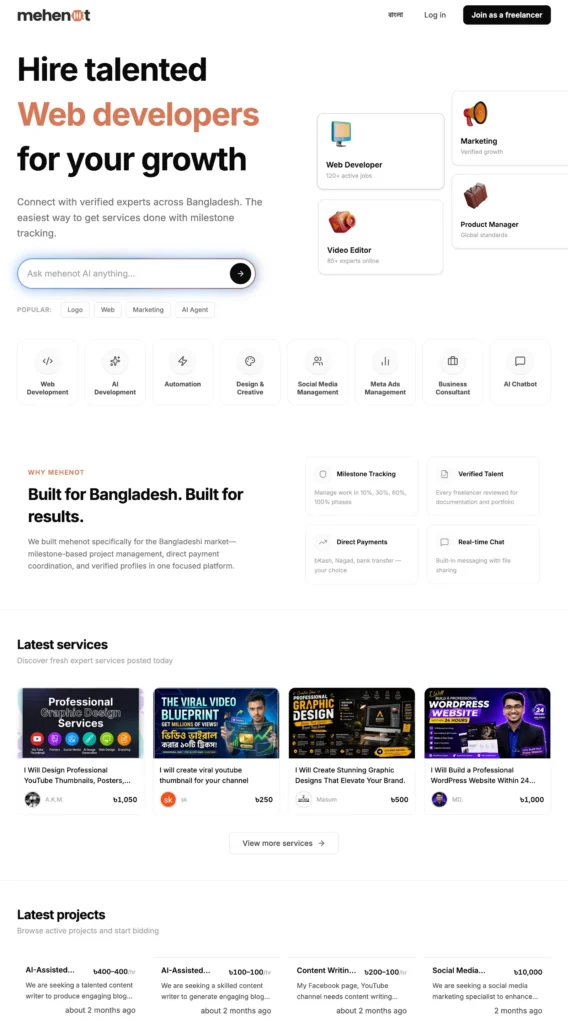
Mehenot is a Bangladeshi freelancing and earning platform that helps people turn their skills into online income. It connects freelancers with local businesses and clients who need services such as graphic design, content writing, website development, video editing, and digital marketing. Android users can download the app, create a profile, explore available projects, and manage freelance work directly from their smartphones.

What makes Mehenot interesting is its focus on the Bangladeshi market. The platform supports Bangla and English, offers AI-powered assistance, and allows freelancers to receive eligible payments through local services such as bKash. Whether you are a student, beginner, or experienced freelancer, this guide explains how to download Mehenot, register an account, find work, complete projects, and withdraw your earnings.
What Is Mehenot App?
Mehenot is an online freelance marketplace developed for Bangladesh. It connects people who have digital skills with businesses looking for professional services. Instead of depending only on international freelance websites, users can explore local projects, communicate with clients, and receive payments in Bangladeshi Taka.
The platform was launched in 2025 and operates under the registered business name SaasVentur. It offers a website and an Android application, making it accessible to people who prefer working from their mobile phones.
Mehenot is a skill-based earning platform. Users earn money by completing approved freelance projects, selling digital services, or participating in eligible partner activities. Their income depends on the work they complete and the payment agreed with clients. You can also explore DoEarn.
Mehenot App Complete Information
| App Details | Information |
|---|---|
| App Name | Mehenot |
| Category | Freelancing and Online Earning |
| Country | Bangladesh |
| Platform | Android and Website |
| Language | Bangla and English |
| Registration | Free |
| Earning Method | Freelance Projects and Services |
| Currency | Bangladeshi Taka (BDT) |
| Withdrawal | bKash and Bank Account |
| Minimum Withdrawal | ৳500 |
| Service Fee | Normally 10% |
| Official Website | mehenot.com |
Why Mehenot Is Useful in Bangladesh
Bangladesh has a growing community of students, freelancers, small business owners, and digital workers. Many people have useful skills but need a convenient way to connect with customers. Mehenot provides a local marketplace where freelancers can present their work and businesses can find suitable professionals.
Another useful feature is its local payment system. Freelancers can manage their earnings in BDT and withdraw eligible balances through supported Bangladeshi payment methods. The platform also includes project records, agreed deadlines, and milestone tracking to make freelance work more organized.
Main Features of Mehenot App
AI-Powered Freelancing Assistant
Mehenot includes an AI assistant that helps users prepare project descriptions, create service information, and discover suitable freelancers. It understands Bangla and English, making it useful for people who prefer communicating in their local language.
Easy Freelancer Profile
Users can create a professional profile that highlights their skills, experience, and previous work. A complete profile helps clients understand the services a freelancer offers and review their portfolio before making a hiring decision.
Local Freelance Projects
The platform focuses on freelance opportunities connected to Bangladeshi businesses. Users can explore project listings, review client requirements, and submit proposals for work that matches their skills.
Digital Service Marketplace
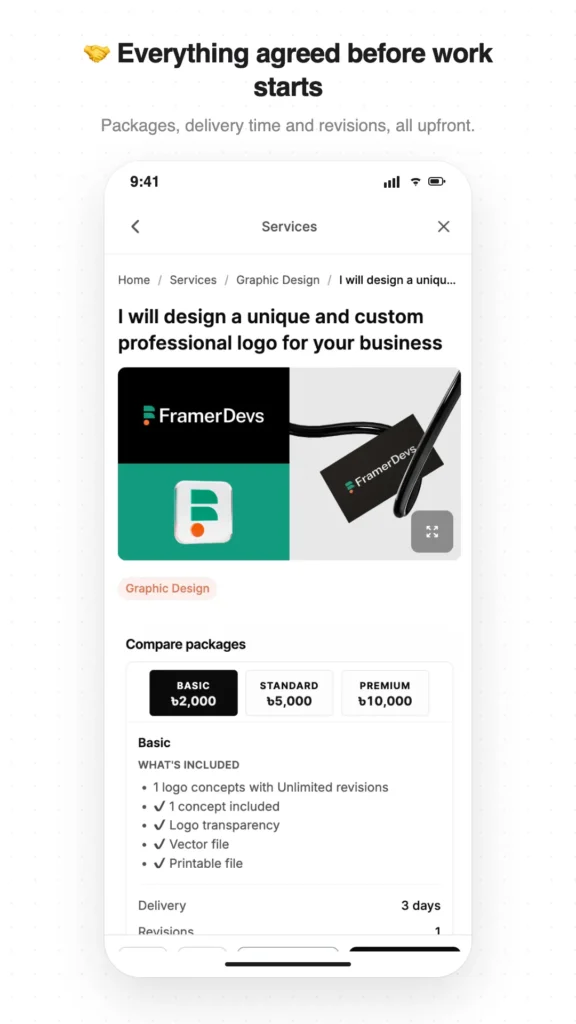
Freelancers can publish services with clear descriptions and prices. Clients can browse these listings and choose suitable professionals for website development, design, writing, marketing, and other digital tasks.
Contract and Milestone Tracking
Mehenot provides tools for organizing project agreements and deadlines. Larger projects can be divided into milestones, helping clients and freelancers follow progress and manage completed work.
Local Payment Support
The platform supports payments in Bangladeshi Taka. Clients can use available local payment options, while freelancers can withdraw eligible earnings to bKash or supported bank accounts.
Reviews and Portfolio Building
Completed projects help freelancers develop their professional profiles. Client feedback and work samples can demonstrate experience and help future customers evaluate their services.
Mobile Notifications
The Android app provides notifications about relevant freelance activity. Users can follow project updates, messages, and other account information from their smartphones.
Online Earning Opportunities on Mehenot
Mehenot offers different categories of digital services. Users can choose work according to their interests, abilities, and experience.
Content Writing
People with writing skills can offer blog posts, website content, product descriptions, and other writing services. Both Bangla and English writing can be useful for businesses that need online content.
Graphic Design
Graphic designers can offer logo creation, banners, social media graphics, and promotional materials. A portfolio containing previous designs helps clients understand their creative style.
Website Development
Users with web development skills can offer business websites, landing pages, and online stores. Clients can discuss their requirements and agree on the project price before work begins.
Video Editing
Video editors can provide services for YouTube videos, Facebook Reels, short videos, and business promotions. This category is suitable for freelancers who understand editing software and visual storytelling.
Digital Marketing
Freelancers can offer social media management, SEO, Facebook marketing, and other online promotion services. These activities help businesses improve their digital presence.
Data Entry and Virtual Assistance
People with computer skills can explore suitable data entry, document formatting, and administrative projects when available. These services often focus on accuracy, organization, and completing assigned work on time.
Mehenot APK Download for Android
Android users can download Mehenot through its official Google Play listing. The application is listed as Mehenot – Freelancing & Jobs.
Follow these steps to download the app:
- Open Google Play Store on your phone.
- Search for Mehenot – Freelancing & Jobs.
- Select the official application.
- Review the app information.
- Tap the Install button.
- Wait for the download to finish.
- Open Mehenot on your Android phone.
Users who prefer an APK file should obtain it only through a verified official source. The Google Play version provides a convenient installation method with automatic update support.
How to Install Mehenot App
Installing Mehenot through Google Play is simple. After tapping Install, Android handles the download and setup process automatically.
Once installation is complete, open the application and follow the welcome instructions. Users can then explore the platform, create an account, and select the services they want to use.
Keeping the Android system updated and maintaining sufficient phone storage can help provide a smoother mobile experience.
Mehenot Account Registration Process
Creating an account is the first step toward using the platform’s freelance features. Mehenot allows users to register and choose whether they want to offer services or hire professionals.
- Open the Mehenot app or official website.
- Select the Sign Up option.
- Enter the requested account details.
- Choose your account role.
- Create a secure password.
- Complete the required verification.
- Set up your profile information.
- Start exploring available features.
Users must be at least 18 years old and provide their own accurate identity information. Completing a genuine profile is an important step toward building a professional presence.
How to Log In to Mehenot App
After registration, users can access their accounts through the application or website.
- Open the Mehenot platform.
- Tap the Login option.
- Enter your registered credentials.
- Type your password.
- Complete any required verification.
- Open your account dashboard.
The dashboard provides access to profile settings, projects, services, messages, and other available tools.
How to Earn Money from Mehenot App
Mehenot allows freelancers to earn through completed digital services. The process begins with creating a useful profile and finding clients who need work.
Follow these steps to start freelancing:
- Register as a freelancer.
- Complete your professional profile.
- Add your skills and portfolio.
- Explore available projects.
- Apply for suitable opportunities.
- Discuss the work with the client.
- Agree on the price and deadline.
- Complete and submit the project.
- Receive payment after approval.
Freelancers can also create service listings so clients can discover their work directly. Building a clear portfolio and delivering quality work can help users develop their freelance careers.
Mehenot Payment and Withdrawal System
Mehenot uses a payment system designed around project agreements and completed work. For new orders, clients pay through the platform before the freelancer begins working. The payment is held until the agreed work is approved.
Once the client approves the delivery, the eligible payment is credited to the freelancer’s wallet after the applicable service fee. Freelancers can then request a withdrawal using a supported payment method.
How Clients Make Payments
- Select a freelancer or service.
- Discuss the project requirements.
- Agree on the work and price.
- Open the official payment section.
- Choose an available payment method.
- Complete the payment.
- Confirm that the project is funded.
How to Withdraw Earnings
- Log in to your Mehenot account.
- Open the Wallet section.
- Check your available balance.
- Select the Withdrawal option.
- Choose bKash or a supported bank account.
- Enter the required payment details.
- Submit the withdrawal request.
- Follow the payment status.
According to Mehenot’s payment information, the minimum withdrawal amount is ৳500, and transfers are sent within seven working days. The platform states that it does not charge an additional withdrawal transfer fee.
Mehenot Payment Methods in Bangladesh
Mehenot supports local payment processing through SSLCommerz and other listed payment partners.
| Payment Method | Availability |
|---|---|
| bKash | Client payments and freelancer withdrawals |
| Nagad | Supported client payments |
| Rocket | Supported client payments |
| Bank Account | Freelancer withdrawals |
| Visa/Mastercard | Supported client payments |
Available checkout methods may depend on the payment gateway. Freelancers should select the withdrawal option shown in their accounts.
Mehenot Service Charges and Earnings
Mehenot generally charges freelancers a 10% service fee on payments received through the platform. Clients do not pay an additional platform fee above the agreed project price.
The platform’s published terms also describe a special 5% service fee for its first 1,000 members until December 31, 2026.
Example of standard freelance earnings:
| Project Payment | 10% Service Fee | Freelancer Receives |
|---|---|---|
| ৳500 | ৳50 | ৳450 |
| ৳1,000 | ৳100 | ৳900 |
| ৳2,000 | ৳200 | ৳1,800 |
| ৳5,000 | ৳500 | ৳4,500 |
| ৳10,000 | ৳1,000 | ৳9,000 |
These examples show how the standard service fee works. Actual earnings depend on completed projects, approved payments, and any applicable promotional fee rate.
Mehenot Partner Program
Mehenot also offers a partner program for users who have an online audience. Participants can share their referral links and introduce businesses or clients to the platform.
According to the platform, partners can receive a share of Mehenot’s service fee when eligible referred users pay for freelance work. The program can provide rewards on qualifying project payments for up to one year.
Users can check the official partner section to understand the current eligibility requirements, referral conditions, and reward calculations.
Mehenot App for Students and Beginners
Students in Bangladesh who have useful digital skills can explore Mehenot as a way to gain freelance experience. The platform offers opportunities to build a portfolio, communicate with clients, and understand how professional online projects work.
Beginners can start by choosing one skill, preparing sample work, and creating a clear service description. For example, someone who understands Canva can offer social media graphics, while a person with writing skills can provide blog content.
Over time, completed projects and genuine client reviews can help freelancers build their professional reputation.
Tips for Better Results on Mehenot
- Complete your profile: Add accurate skills and details.
- Show your work: Upload useful portfolio samples.
- Choose suitable projects: Apply for work you can complete.
- Write clear proposals: Explain how you can help clients.
- Set fair prices: Match pricing with project requirements.
- Communicate politely: Keep project discussions professional.
- Follow deadlines: Deliver agreed work on time.
- Maintain quality: Review your work before submission.
- Track payments: Use the official wallet and project records.
- Build your reputation: Earn genuine feedback through completed work.
Mehenot App Safety and Account Security
Mehenot provides tools for keeping project agreements, messages, and payment records together. These features help freelancers and clients understand the work they have agreed to complete.
Users can improve their account security by choosing strong passwords, protecting verification codes, and using the platform’s official communication tools. Freelancers should also confirm that project payments are held by Mehenot before starting work under the current payment system.
Keeping work discussions and payments within the platform helps users maintain clear records and access its available dispute-resolution process.
Common Mehenot App Problems and Solutions
Login Problems
Check your registered credentials and internet connection. Use the official account recovery option when needed.
Profile Verification
Provide accurate personal information and follow the verification instructions shown in your account.
Finding Freelance Projects
Complete your portfolio, explore relevant categories, and submit clear proposals for projects that match your skills.
Payment Status
Open your wallet and review the payment history. The official support team can assist with account-specific questions.
App Loading Problems
Update the application, check your internet connection, and restart your phone when necessary.
Pros and Cons
| Pros | Cons |
|---|---|
| Bangladesh-focused freelance marketplace | Requires useful digital skills |
| Free account registration | Project availability varies |
| Bangla and English support | Internet access is required |
| AI-powered assistance | Earnings depend on completed work |
| Local bKash withdrawals | Service fees apply |
| Portfolio and review features | Account verification may be required |
| Contract and milestone tracking | Client approval is part of payment processing |
Final Thoughts
Mehenot App provides a local freelancing experience for people in Bangladesh who want to earn money through their digital skills. Its combination of freelance projects, service listings, AI assistance, account management, and local payments makes it an interesting platform for both beginners and experienced professionals.
Android users can download Mehenot, create a professional profile, and explore available work opportunities. By improving their skills, preparing useful portfolios, and completing projects carefully, freelancers can build experience and work toward earning online through genuine digital services.
FAQs
Yes. Mehenot has an Android application listed on Google Play as Mehenot – Freelancing & Jobs.
Yes. Freelancers can earn money by completing approved projects and selling digital services to clients.
Yes. Users can create an account without a registration fee. Service fees apply to eligible freelance payments.
Yes. Mehenot lists bKash as a supported withdrawal method for freelancers.
The platform currently states a minimum withdrawal amount of ৳500.
The standard freelancer service fee is 10%, with a published promotional 5% rate for eligible founding members.
Download links
How to install Mehenot Apk v1.2.9 Download (BD Online Workspace) Platform APK?
1. Tap the downloaded Mehenot Apk v1.2.9 Download (BD Online Workspace) Platform APK file.
2. Touch install.
3. Follow the steps on the screen.







